The Power of Toggle Buttons in SharePoint Dashboards
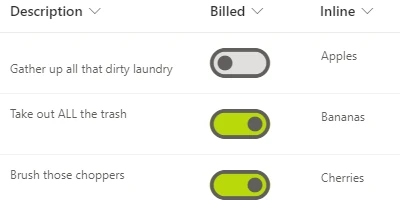
Toggle buttons have become an essential feature for users who interact with SharePoint lists. Acting similarly to checkboxes, toggle buttons provide a convenient way to switch between yes/no fields, which is an intuitive process akin to flipping a light switch. This article delves into how toggle buttons and other templates from SharePointDashboards.com can transform your SharePoint environment into a highly efficient, user-friendly platform for charting, visual status indicators, project approvals, employee management, and status tracking.
Integrating Toggle Buttons into SharePoint
The toggle button's simplicity is its strength. Familiar to users, it leverages a concept which parallels the universal light switch, thereby enhancing user interaction with SharePoint lists. By using toggle buttons, teams can effortlessly manage yes/no fields, improving data input efficiency and accuracy. Setting up a toggle button in SharePoint is remarkably simple. Users are only required to visit SharePointDashboards.com, sign up for a free account, and access the Toggle Button Template, which is one of 21 free templates available for unlimited use. After making any preferred styling adjustments, a simple copy and paste into a SharePoint column accomplishes the setup.
Enhancing SharePoint with a Range of Templates
Beyond toggle buttons, SharePoint Dashboards provides hundreds of templates tailored to various SharePoint enhancement needs. Whether you require basic improvements or a comprehensive charting platform, SharePoint Dashboards offers a plethora of options. The templates available not only simplify SharePoint list functionalities but also streamline processes like charting and status reporting, aligning perfectly with varied organizational requirements.
Dashboard-Driven Team Communication
Effective team communication is crucial, and a shared dashboard in SharePoint facilitates this by providing a centralized platform where team members can access real-time information. With these dashboards, teams can better chart progress, manage employee activities, track project statuses, and monitor visual indicators all within a single interface. This synthesis of information leads to clearer, more efficient communications among team members, thus enhancing collaboration and coordination across projects.
Use Case Scenarios
There are several practical scenarios where a SharePoint dashboard with integrated toggle buttons and other templates would be beneficial:
- Project Approvals: Managers can utilize toggle buttons to approve or reject project proposals swiftly, ensuring a streamlined approval process.
- Employee Management: Track employee attendance or task completion status using toggle buttons, keeping the team updated on each member's progress and availability.
- Status Tracking: Use dashboards to monitor the status of ongoing projects, allowing team members and stakeholders to view progress in real-time.
- Visual Status Indicators: Implementing visual cues through dashboards helps in quickly assessing the health of projects or departments at a glance.
Through these use cases, it becomes evident how toggle buttons and comprehensive dashboards provide organizations with critical information updates, leading to informed decision-making and optimized operations.
SharePoint JSON Formatting Explained
One of the unique advantages of using templates from SharePointDashboards.com is the ease of SharePoint JSON formatting. This formatting approach allows customization of SharePoint list views, providing a more customized and visually appealing interface. With pre-designed templates, users can apply JSON formatting directly to list views, enhancing how information is displayed. This transformation not only simplifies the user experience but also ensures that critical data is presented in an accessible manner.
Conclusion
The incorporation of toggle buttons and other templates from SharePointDashboards.com represents a significant advancement in utilizing SharePoint for enhanced productivity and communication. The simplicity of integration-achieved by copying and pasting templates-combined with the range of available functionalities, makes it a pivotal tool for any organization seeking to improve their SharePoint interface. By facilitating improved communication, project tracking, and management efficiency, these templates empower teams to achieve more, fostering an environment of collaboration and informed decision-making. Explore SharePointDashboards.com today to revolutionize how your team engages with SharePoint, streamlining your operations for success. For more information, view the detailed
video on how these tools can be employed to their highest potential.