Enhancing SharePoint with Dynamic Weather Forecast Templates
SharePoint, a robust platform for content management and collaboration, becomes significantly more inviting and effective when infused with dynamic and practical information that appeals to its users. One strategic addition that can elevate user interaction and engagement on SharePoint is the deployment of dynamic weather forecast templates. These can easily be integrated into SharePoint pages via templates available at
SharePointDashboards.com.
Adding Value with Weather Forecasts on SharePoint
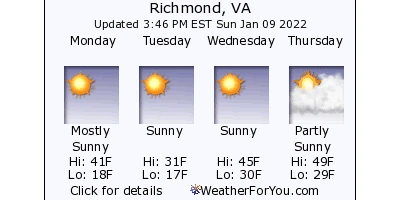
The Weather Forecast template, one of the three weather-related templates offered at SharePointDashboards.com, introduces a real-time dimension to your SharePoint site. Users have the opportunity to view the current weather conditions, a future weather forecast, or a radar map displaying weather patterns. Including this forecasting capability on your site not only provides valuable information but also enhances the functionality and interactivity of your SharePoint pages. Whether preparing for potential travel disruptions due to snow or rain, or planning an outdoor event during a hot day, having this weather information readily available helps users make informed decisions throughout their day.
Integration of Weather Forecasts with Team Activities
Incorporating a weather forecast uses more than just adding a visual element to your SharePoint page. It plays a crucial role in a variety of functions such as charting, visual status indicators, project approvals, employee management, and status tracking. Reliable weather data can influence operational planning and project timelines, offering teams an actionable insight that aids in strategic decision-making.
Enhancing Team Communication with Shared Dashboards
Shared dashboards are a powerful tool enabling teams to communicate better by offering a centralized location for critical information. The addition of a weather forecast section expands the scope of these dashboards, providing not only status updates and project metrics but also external conditions that could impact project execution. This shared visibility ensures that all team members, regardless of their location, are synchronized and aware, facilitating better planning and collaboration.
Effortless Setup on SharePoint
Implementing these weather forecast templates in SharePoint is straightforward, thanks to the ease of use provided by SharePointDashboards.com. These templates can be added to your SharePoint site through a simple copy and paste process. The availability of 21 free templates means there's no cost barrier to getting started, making it possible for any organization to enhance their SharePoint site with dynamic content. These templates are customizable and can fit seamlessly into the structure of your existing dashboards, ensuring you can maintain the aesthetic integrity of your site while bolstering its functionality.
Use Case Scenarios
A multitude of scenarios can benefit from the integration of a weather forecast into SharePoint dashboards:
- Project Management: Teams managing outdoor projects will find this feature indispensable for planning around weather-related disruptions.
- Event Coordination: Organizers can effectively adjust their plans according to real-time weather predictions, ensuring events run smoothly regardless of weather conditions.
- Sales and Field Operations: Employees working in the field can access up-to-date weather conditions, which is crucial for route planning and client visits.
- Resource Allocation: Operational managers can make decisions on resource deployment with greater accuracy by factoring in weather conditions.
SharePoint JSON Formatting
SharePoint JSON formatting is a nuanced way to enhance the presentation of SharePoint lists and libraries. By applying a template to a SharePoint list view, you can create structured and visually appealing displays of information. The process involves crafting JSON code, which instructs SharePoint on how to format the data being presented. By utilizing these techniques and templates, organizations can align their data presentation with their brand identity while also enhancing the usability of their SharePoint lists.
Conclusion
Integrating weather forecast templates into SharePoint pages provides a broad spectrum of benefits. From improving operational efficiency to enhancing communication and project management, the addition of dynamic weather information can significantly increase the utility and engagement of your SharePoint site. SharePointDashboards.com offers a gateway to these enhancements, allowing your organization to harness the power of weather forecasts through straightforward integration of simple, customizable templates. Engage your team, streamline your operations, and improve your decision-making processes by embedding dynamic weather templates into your SharePoint environment today.