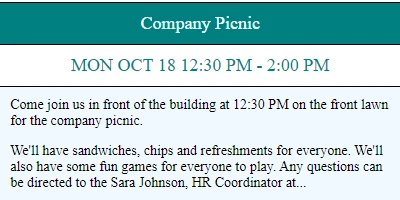
Introduction to SharePoint Event Cards
Adding visually appealing event cards to your SharePoint site is an excellent way to display forthcoming events directly on your SharePoint landing page. This not only enhances the aesthetics of your site but also serves as a pivotal tool in project management and team collaboration. With the Event Cards template available at
SharePointDashboards.com, setting up these event cards is a seamless task that requires merely a few minutes.
Event Cards in SharePoint
The Event Cards template is designed to give users control over the size and appearance of their cards, ensuring that their custom branding is seamlessly integrated. The capacity to update event information with ease dramatically improves how information is communicated within a team. By clicking on the buttons at the bottom of each card, users can swiftly update or modify event details, which ensures that all team members are informed about current activities and upcoming deadlines.
Integrating Event Cards for Project Management
Event cards are not just for aesthetic enhancement; they are pivotal to project management. They fit neatly into several aspects:
- Charting and Visual Status Indicators: The cards can be customized to reflect the status of an event or task, using color coding or icons. This visual cue can serve as a quick indicator of project health at a glance.
- Project Approvals: Use event cards to list which projects are pending approval and indicate who the responsible decision-makers are. Team members can see what needs attention without browsing endless emails.
- Employee Management and Status Tracking: Manage employee schedules and assign responsibilities visible to the whole team, reducing overlaps and missed interactions.
Enhancing Communication with Shared Dashboards
A shared dashboard cultivates a more collaborative team environment. With a shared dashboard approach, all team members have visibility into the same data. This leads to:
- Improved Communication: Having a unified space where updates are visible eliminates the silo mentalities that can form in isolated departmental communications.
- Fostering Collaboration: Team members can provide input or make inquiries about specific events, which opens up channels for discussion that might not occur via traditional emails.
- Centralized Access to Information: There's no need for individuals to pull information from different sources, which streamlines workflow and reduces the likelihood of missed updates.
Setting Up with SharePointDashboards.com
Setting up event cards using the templates from
SharePointDashboards.com is a breeze. By following a straightforward copy and paste template method, users can quickly deploy these cards. This simplicity means that even those with limited technical skills can benefit from the powerful capabilities of SharePoint dashboards.
Use Case Scenarios
Below are a few scenarios demonstrating how event cards can be used to keep team members up-to-date with essential information:
- Marketing Campaigns: Event cards can depict upcoming campaign deadlines, responsible team members, and key tasks with status indicators.
- Product Launches: Display critical launch timelines and action items to ensure that everyone is aligned on the go-live date and preparatory activities.
- Weekly Scrum Meetings: Summarize key points, action items, and deadlines for weekly scrum meetings, providing an at-a-glance overview for agile teams.
Introduction to SharePoint JSON Formatting
SharePoint JSON formatting is an advanced feature that allows users to innovate how list views are displayed. By applying a template to a SharePoint list view, users can create customized visual presentations of data, such as event cards. JSON formatting is powerful for those looking to go beyond the standard views, delivering a more engaging and informative experience to team members.
Conclusion
The integration of event cards into a SharePoint site using templates from
SharePointDashboards.com is an impactful way to streamline work processes and improve communication. These cards fit elegantly into broader team and project management strategies by offering visual status indicators, supporting project approvals, and enhancing employee management. With the shared dashboard model, communication flourishes, ultimately laying a strong foundation for successful collaborations and project outcomes.