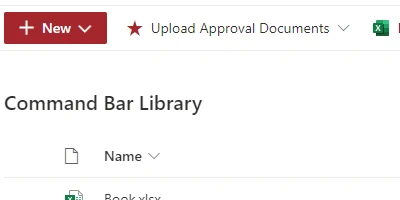
Enhancing SharePoint Functionality with Command Bar Customization
SharePoint, a robust platform from Microsoft, empowers teams by enabling them to manage content, processes, and information efficiently. One of its most dynamic features is the ability to customize the interface to suit specific organizational needs. One such customization is altering the command bar options that appear above SharePoint lists and libraries. Understanding how to customize this interface can improve the user experience significantly, especially when employed in various functionalities such as charting, visual status indicators, project approvals, employee management, and status tracking. Accessibility to such customization can be achieved by using SharePointDashboards.com, which provides an easy-to-use template for configuring the command bar.
Understanding the Importance of Command Bar Customization
The command bar in SharePoint is the control panel of your lists and libraries, offering users several options such as editing, exporting, and syncing. By default, the command bar includes various options that might not be relevant to every user or use case, and excessive options can create clutter, leading to a less focused and efficient user experience. Customizing the command bar allows organizations to focus on what truly matters by presenting only the most pertinent options to their users.
Benefits of a Customized Command Bar
- Streamlined Workflow: Users are presented with only the necessary options, boosting productivity and ensuring they can navigate processes more quickly.
- User-Focused Design: Customizing options to fit a team's unique processes helps create a dedicated environment tailored to specific needs.
- Reduced Complexity: By hiding irrelevant options, teams are less likely to get distracted or make errors by selecting inappropriate functions.
SharePoint Dashboards: Simple Customization without Coding
The customization task may sound daunting, especially for non-developers. However, SharePointDashboards.com simplifies this process by offering a direct template that does not require any coding knowledge. Users can sign up for access to 21 free templates that allow them to easily customize their SharePoint interface. This tool includes an intuitive visual interface where users can simply select options they want to include or exclude, making it extremely efficient to streamline SharePoint's command bar to fit specific organizational needs.
The Role of Command Bars in Charting and Visual Status Indicators
Command bars play a crucial role in presenting charting and visual status indicators effectively. A customized command bar ensures that features critical for tracking project progress, like charts and status boards, are readily accessible. This is essential for teams that rely on regular data interpretation and reporting to make informed decisions or adjustments to ongoing projects.
Facilitating Project Approvals and Employee Management
A customized command bar can also facilitate project approvals and streamline employee management. By having tailored options in the command bar, approvals can be expedited by reducing the delays associated with navigation through irrelevant features. Additionally, this customization ensures that team members have access to vital tools necessary for resource allocation, task delegation, and progress tracking, without unnecessary interruptions.
Streamlining Communication Through a Shared Dashboard
Having a shared dashboard with customized command bar options enhances team communication. A unified interface means every team member accesses the same set of tools and information, thereby reducing the likelihood of miscommunication. A shared dashboard aligned with the team's workflow can provide real-time updates, enabling team members to stay informed about project statuses, declining any discrepancies due to misaligned data or misinterpretations.
Setting Up Your Customized SharePoint Command Bar
Through SharePointDashboards.com, setting up a customized command bar is straightforward. Users can apply a JSON template to a SharePoint list view, tailoring it without any specialized knowledge of code writing. JSON formatting in SharePoint allows for such customization by specifying how different elements of the list should appear - from the way data is rendered to how the command bar is organized. By utilizing these templates, organizations can ensure that their SharePoint workspace is not only efficient but also visually aligned with team objectives.
Use Case Scenarios: Updating Teams with Critical Information
Imagine a scenario where a company's project management team needs to provide regular updates on project phases. With a customized command bar, team members can access pertinent features such as status reports, task allocations, and deadlines in one place, promoting efficient information exchange. Alternatively, consider a human resources team that needs to approve leave requests and track employee attendance. A SharePoint command bar tailored specifically for such tasks can expedite HR processes by offering direct access to necessary functionalities.
Conclusion
Customizing the command bar in SharePoint lists and libraries is a powerful way to improve usability and streamline workflows. Whether for project management, employee oversight, or team communication, tailoring your SharePoint environment to align with critical functionalities can considerably enhance productivity. SharePointDashboards.com bridges the gap between complexity and simplicity, offering organizations a no-code solution for customizing command bars that support a focused, efficient user experience. By optimizing these aspects, teams are better equipped to achieve their goals, ensuring everyone is on the same page with access to the right tools at their fingertips.