
Enhancing SharePoint Lists with the Background Color Picker Template
SharePoint lists are powerful tools for organizing information and maintaining project records. However, when using the default SharePoint settings, these lists can appear somewhat plain and may not effectively convey the status or priority of listed items at a glance. For teams striving to improve information processing and decision-making speed, the Background Color Picker template from SharePointDashboards.com offers an innovative solution. By applying row highlighting to SharePoint lists, users can quickly identify the significance of various records, improving both clarity and operational efficiency.
Transforming SharePoint Lists with Color
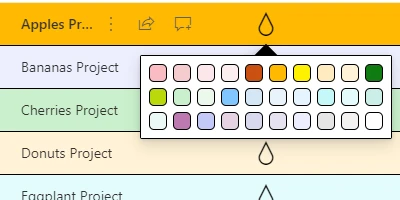
With the Background Color Picker template, teams can seamlessly highlight SharePoint list rows using background colors. This transformation from a plain list to a visual masterpiece is easily achieved with just a few clicks. The color-coding helps users to visually understand and prioritize records, enhancing overall user experience and reducing the time taken to process information.
Benefits of Visual Status Indicators
The integration of background color coding into SharePoint lists allows teams to create intuitive visual status indicators. This enhancement is particularly useful in areas such as:
- Charting: Visual status indicators serve as a real-time chart for team members, reflecting the current status and progress of tasks or projects.
- Project Approvals: Easily distinguish between pending approvals and completed tasks by using distinctive color codes.
- Employee Management: Track employee performance or assignment completion at a glance, facilitating better management and communication.
- Status Tracking: Instantly see which tasks are on track, which are behind schedule, and which have been completed.
Improved Communication with Shared Dashboards
Shared dashboards equipped with visually enhanced SharePoint lists encourage better team communication. When team members share a common visual language through the color-coded status of tasks, it reduces misunderstandings and fosters proactive discussion. This shared understanding lays the foundation for effectively coordinating resources and managing timelines.
Implementing the Template from SharePointDashboards.com
Applying the background color highlighting to SharePoint lists is straightforward. Users can simply copy and paste the template from SharePointDashboards.com directly into their SharePoint list. This intuitive setup process makes it easy for team members, regardless of their technical expertise, to benefit from enhanced list visualizations. Critical records can be highlighted in yellow to signify importance, while completed tasks can be indicated with green, signifying their ready status. Teams can assign custom colors according to their specific workflows, ensuring the visualization aligns with their operational needs.
Getting Started
For those new to this concept, SharePointDashboards.com offers access to 21 free templates to help users get started on customizing their lists. This valuable resource opens the doors to a new level of list interaction and functionality, making data visualization in SharePoint both effective and accessible.
Use Case Scenarios
The application of the Background Color Picker template can be pivotal in numerous scenarios:
- Project Management: Managers can quickly discern which project tasks are delayed and which are on time, allowing for immediate intervention when necessary.
- Team Meetings: By providing a visual status update, team members can prepare more effectively for meetings, knowing the current standing of project components.
- Critical Updates: When time-sensitive updates are needed, the background color-coded lists serve as effective visual alerts for urgent action.
Understanding SharePoint JSON Formatting
JSON (JavaScript Object Notation) formatting in SharePoint enables dynamic list view customization. By applying a template, such as those provided by SharePointDashboards.com, to a SharePoint list view, users can easily alter the display of data without altering the underlying information. This allows for more streamlined updates, making it visually appealing and more meaningful for users to interpret.
Conclusion
For teams looking to enhance how they interact with data, the Background Color Picker template from SharePointDashboards.com is an invaluable tool. It not only makes information more accessible and easier to digest but also creates opportunities for improved project management, communication, and workflow visualization. By embracing these tools, organizations can ensure that they are working smarter, not harder, allowing both individuals and teams to thrive in a visually-driven work environment.
















