Enhancing Team Coordination with the Input Logging Template in SharePoint
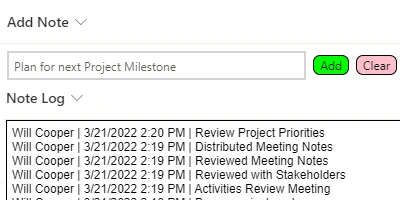
In the modern workplace, effective communication and project management can make the difference between success and failure. For teams striving for seamless coordination and up-to-date information sharing, the Input Logging Template for SharePoint is a game-changer. This powerful tool allows teams to set up a simple logging input in their SharePoint list, enabling members to append notes with incremental updates directly from the list view. By integrating the Input Logging Template, teams can streamline their work processes, improve status tracking, and enhance project management.
Facilitating Charting and Visual Status Indicators
In project management, maintaining an up-to-date status is crucial. With the Input Logging Template, users can effortlessly update their notes, which could then be reflected in visual status indicators across dashboards. By having real-time data at their fingertips, managers can make informed decisions faster. When coupled with charting tools, the continuously updated log of insights helps leaders visualize project flow and identify potential bottlenecks before they escalate.
Supporting Project Approvals
Seamless communication is critical during the project approval process. With the Input Logging Template, stakeholders can monitor progress through regularly updated notes in the SharePoint list. Decision-makers can review these comments without needing to dive into individual files or emails, thereby expediting the approval process and ensuring all necessary adjustments are made promptly.
Streamlining Employee Management and Status Tracking
When managing a team, knowing the status of tasks or understanding the needs of team members is vital. With the Input Logging Template, managers can efficiently track progress or productivity trends by observing the frequency and content of updates. Status tracking isn't isolated to projects, as human resources can harness this functionality for employee management, ensuring efficient follow-ups on staff performance or feedback.
How Teams Communicate Better with a Shared Dashboard
A shared dashboard serves as the information hub where each team member can quickly access critical data. By utilizing the Input Logging Template, teams can make sure the shared dashboard remains consistently updated. This fosters an environment where informed decisions are made quickly, reducing the need for lengthy meetings and prolonged email chains. Everyone is literally on the same page, promoting a collaborative atmosphere where transparency is paramount.
Setting Up the Template in SharePoint
Deploying the Input Logging Template is a straightforward process. Accessing resources from
SharePointDashboards.com, users can copy and paste the template directly into their SharePoint list. This ease of deployment removes complexities, allowing even those with minimal SharePoint expertise to establish an effective logging system. Once activated, users can append notes directly in the list view with no additional SharePoint forms to navigate-simplifying the workflow significantly.
Use Case Scenarios for Critical Information Updates
Several scenarios exemplify how the Input Logging Template can serve as a vital tool for updating team members with critical information:
- Project Management: Project leads can log significant project milestones or issues instantly as they arise, ensuring the whole team remains informed.
- Customer Support: Support teams can track customer issues or complaints, recording each interaction and response chronologically, thus maintaining a transparent resolution process.
- Product Development: Developers and product managers can log test results or feature update notes in the shared list for quick reference during team stand-ups or sprint reviews.
- Compliance Tracking: Compliance officers can keep detailed logs of updates to company policies or changes in regulations as a running document available to all stakeholders.
Creating with SharePoint JSON Formatting
A noteworthy feature of the Input Logging Template is its ability to incorporate SharePoint JSON formatting. By applying a template to a SharePoint list view, users can transform standard list data into a visually engaging interface with conditional formatting, highlighting critical updates or categorizing notes based on urgency or priority. This elevated presentation not only aids in better comprehension but ensures all team members are immediately aware of significant developments.
Conclusion
In a fast-paced business environment, having the right tools is essential for success. The Input Logging Template offers an efficient solution for teams in need of a simple yet powerful method for maintaining up-to-date communications within SharePoint. Coupled with other capabilities like status indicators, project approvals, and employee management, it allows for enhanced team collaboration and decision-making. By leveraging the many templates available at SharePointDashboards.com, organizations can tailor their SharePoint experience to suit their unique needs, ensuring every team member stays connected and informed.