
Stand Out: Identifying Active Users in SharePoint Lists - June 3, 2025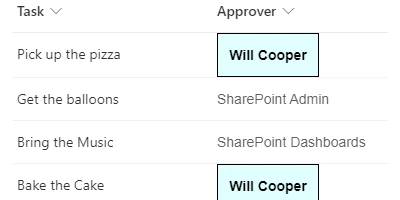
IntroductionHighlight Me is an innovative SharePoint Dashboards formatting template that plays a vital role in employee management and project tracking. Designed to enhance usability and visibility within SharePoint lists, this tool allows the current user to be highlighted effectively. It simplifies the process of identifying which projects or tasks require attention and is particularly beneficial for teams seeking better communication and streamlined project approvals.The Importance of Visual Status IndicatorsStrong visual status indicators are essential for project management. They provide a quick and effective way to communicate critical information to team members, helping stakeholders to understand their tasks at a glance. With Highlight Me whether you are navigating a comprehensive project or managing a small team, highlighting current users ensures clarity. This technique aligns with visual management strategies, offering real-time updates on task progress and responsibilities.Charting and Project ApprovalsIncorporating the Highlight Me template into your SharePoint site enhances charting functionalities by allowing team members to see who is responsible for each task. It aids in project approvals, as management can quickly review and verify who has been assigned specific tasks. This feature is particularly significant in approval workflows, where timely evaluations can lead to faster decision-making and efficiency in project execution.Improved Communication with Shared DashboardsBy using a shared dashboard, teams significantly improve their communication. Shared dashboards act as a centralized platform where all relevant data and task allocations are visible. The Highlight Me template integrates seamlessly into SharePoint, allowing users to customize experiences that best fit their needs. This shared visibility encourages collaboration and ensures that all team members are on the same page, thus facilitating more productive meetings and communications.Setting Up Dashboards in SharePointSetting up dashboards with the Highlight Me template in SharePoint is a straightforward process. Through SharePointDashboards.com, users can easily access this template. By selecting the preferred formatting highlight option, users simply copy and paste the template directly into their SharePoint list column. This simplicity not only saves time but also ensures that even those with minimal experience can enhance their SharePoint functionalities efficiently.Use Case ScenariosConsider a team working on a large software development project that requires numerous updates and frequent handoffs between different members. With the Highlight Me template, it's easy for developers, managers, and stakeholders to see which tasks pertain to them, thereby eliminating confusion and ensuring everyone knows their responsibilities. Another scenario could be in customer service management. When employees can quickly see the cases they need to handle marked clearly on a dashboard, response times improve, and employee satisfaction increases. Similarly, in a marketing campaign, team members involved in different phases can track their progress and stay aligned with team objectives by illuminating specific tasks in the shared dashboard.Understanding SharePoint JSON FormattingSharePoint JSON formatting is a fantastic feature that enables users to apply custom designs to their SharePoint list views. By applying a customizable template directly to a SharePoint list view, users can transform how data is presented. The JSON format outlines which strings or properties require changes, offering flexibility and creativity to users wanting a comprehensive yet unique interface. The Highlight Me template can be applied via JSON formatting, offering another layer of customization within your SharePoint environment.ConclusionIn conclusion, the Highlight Me SharePoint Dashboards formatting template is a powerful tool in the arsenal of any team looking to enhance their project management processes. It offers clear advantages in the realms of visual status representation, project tracking, communication, and team alignment. By facilitating a straightforward setup process through SharePointDashboards.com and integrating sophisticated JSON formatting, this template advances efficiency. Whether you're focused on better project approvals or clearer team communications, this tool is invaluable in creating a more streamlined, visually engaging work environment.Watch a video to learn more:
|
















