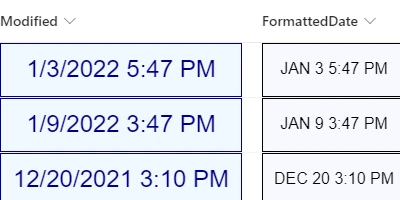
Formatting Date Time Fields in SharePoint Lists
Formatting Date Time fields in SharePoint lists is an essential task that enhances user experience significantly. However, out of the box, SharePoint lacks robust features to aesthetically present date information. This is where using a Date Format template from
SharePointDashboards.com comes into play, allowing for seamless control over the appearance of date time fields. With every aspect of formatting under your control, this tool ensures that you can present information in a way that is functional and visually appealing.
Customization Options
The SharePoint Date Format template offers extensive customization options, allowing you to tailor the presentation of your date time fields. You can choose which elements to display, such as the day of the week, the full month name, hours, minutes, and more. Additionally, the template allows for inline editing, making it possible for users to update information directly from the SharePoint list view. This ease of use facilitates efficient and accurate data management.
Seamless Integration with SharePoint
When setting up charts, visual status indicators, and more, having a consistent format is crucial. This plays a significant role in project approvals, employee management, and status tracking. By having shared formatting standards, teams can communicate better using shared dashboards, making it easier to keep updated with real-time data. A unified approach simplifies how information is consumed across the organization and reduces the chance of errors that can occur when interpreting misaligned data.
Improving Team Communication with Dashboards
A shared dashboard plays an integral part in improving team communication. By having all critical information shown in a cohesive manner, team members are better informed and can make quicker decisions. Users can access real-time data pertinent to their roles, thereby reducing the frequency of back-and-forth communications and freeing up time for productivity. Whether it's project timelines, task lists, or resource allocation, a shared dashboard ensures that everyone is on the same page.
Implementing with SharePoint Templates
Setting up a SharePoint dashboard with curated templates is an easy process. At
SharePointDashboards.com, you can use a simple copy-and-paste template to get started immediately. For those new to SharePoint Dashboards, signing up provides access to 21 free templates, which can get you started on creating your customized dashboards with ease.
Use Case Scenarios
SharePoint dashboards with formatted Date Time fields can be used across various scenarios. Here are a few practical applications:
- Project Management: Track project timelines and deadlines efficiently, ensuring that team members adhere to project schedules.
- Employee Management: Maintain updated records of employee start dates, appraisal periods, and other HR data.
- Status Tracking: Monitor the progress of ongoing tasks and make informed decisions based on project development stages.
These scenarios showcase the vital role that properly formatted Date Time data can play in maintaining operational efficiency.
SharePoint JSON Formatting
A significant feature of the SharePoint Date Format template is the ability to apply JSON formatting to SharePoint list views. JSON (JavaScript Object Notation) formatting is a lightweight data interchange format that makes it easy to read and write data. By applying a template, you can transform a basic list view into a richly formatted and interactive visual experience. JSON formatting enables you to define how your lists appear-adjust colors, styles, borders, and fonts to fit your organization's branding and make data interpretation intuitive.
Conclusion
Formatting Date Time fields in SharePoint lists is an overlooked yet critical aspect of creating effective dashboards. By leveraging templates from
SharePointDashboards.com, you can enhance the usability and aesthetics of your data presentation. This tool not only aids in creating a unified view among team members but also improves overall communication and efficiency. With easy-to-use templates and extensive customization options, harnessing the power of SharePoint has never been more straightforward. Whether you're focused on project approvals or keeping track of employee status, the benefits of a well-formatted and shared data dashboard are undeniable. Sign up today to access free templates and transform how your organization manages and views its critical information.