Asset Tracking in Organizations
Asset Tracking is a key requirement in organizations, especially when it comes to technology-based systems. Keeping track of various assets, ranging from office equipment to complex machinery, requires an efficient system capable of providing a clear overview of what is owned and where it is located. An effective asset tracking system in SharePoint uses visual aids, facilitating communication, monitoring, and decision-making processes. This article explores how SharePoint dashboards enhance asset tracking and improve organizational efficiency.
SharePoint Dashboards: Revolutionizing Asset Tracking
SharePoint, a widely used collaboration platform, integrates with numerous business processes, including asset management. With the Asset Tracking Cards template available from
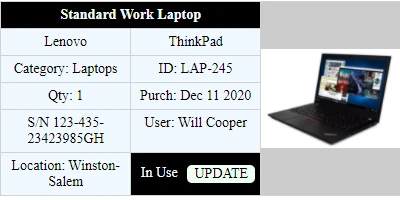
SharePointDashboards.com, organizations can transform basic lists into visually engaging dashboards. The Asset Tracking Cards template provides a copy-and-paste solution that makes creating a great-looking asset tracking list straightforward and quick. This template allows users to visualize assets with pictures and key information such as status, location, make, model, serial number, quantity, and purchase date.
The Advantages of Visual Status Indicators
Unlike a basic SharePoint list, the Asset Tracking Cards template offers a vivid and intuitive way to display asset data. Visualization aids in quickly identifying different types of equipment and understanding their current status. This functionality is crucial for various purposes, including:
- Charting: With visually represented data, teams can effectively monitor the performance and utilization of assets over time.
- Visual Status Indicators: These indicators provide at-a-glance status updates, enhancing the decision-making process.
- Project Approvals: Quick access to asset information streamlines project approvals that rely on asset availability and condition.
- Employee Management: Resource allocation and scheduling are simplified, increasing overall productivity.
- Status Tracking: Easily track the lifecycle and condition of each asset, ensuring timely maintenance and replacements.
Facilitating Better Team Communication with Shared Dashboards
A shared dashboard significantly improves team communication within an organization. With SharePoint dashboards, teams can:
- Access Up-to-Date Information: Dashboards provide real-time data, ensuring all team members stay informed about asset statuses.
- Collaborate Effectively: With a single platform for asset data, teams can collaborate seamlessly without the need for lengthy email threads or unnecessary meetings.
- Enhance Transparency: Shared dashboards promote transparency, enabling everyone to see and understand asset management strategies.
By displaying the necessary information in an easy-to-understand format, dashboards bridge communication gaps, facilitating smoother operations across departments.
Implementing Asset Tracking with SharePoint
Setting up the Asset Tracking Cards template from SharePoint Dashboards is surprisingly straightforward. It requires only a simple copy and paste to implement, allowing teams to get started in minutes. This ease of setup means minimal disruption and a swift transition to an enhanced tracking system. Employees can quickly learn to navigate these dashboards, making adoption seamless and efficient across the organization.
Use Case Scenarios for the Asset Tracking Dashboard
The Asset Tracking Cards template can be utilized in various scenarios to update team members with critical information effectively:
- IT Departments: Track computers, servers, and networking equipment to ensure they are up-to-date and in working condition.
- Facility Management: Monitor and maintain office furniture and equipment, ensuring they are available and properly maintained when needed.
- Manufacturing Plants: Track machinery and parts, ensuring timely maintenance and minimizing downtime.
- Logistics and Distribution: Keep track of vehicles and delivery equipment status, ensuring efficient scheduling and dispatch.
Understanding SharePoint JSON Formatting
The customization of SharePoint views using JSON formatting is one of SharePoint's powerful features. This capability enables users to apply a template to a SharePoint list view, enhancing the presentation of data. The Asset Tracking Cards template exploits this feature, as JSON formatting allows for customization beyond traditional static lists. Administrators can create dynamic and interactive dashboards by applying these templates, making them more engaging and practical for end-users.
Conclusion
In conclusion, an effective asset tracking system is essential for any organization that relies on technology-based systems to operate efficiently. Using SharePoint dashboards, particularly the Asset Tracking Cards template, presents a visual, easy-to-manage solution for asset tracking. This approach fosters improved communication, efficient resource management, and quick decision-making. With enhanced visuals and seamless implementation accessible through a simple copy-paste from
SharePointDashboards.com, organizations can elevate their asset management strategies significantly, ensuring optimal utilization of resources.