Enhancing SharePoint Libraries with Download Buttons
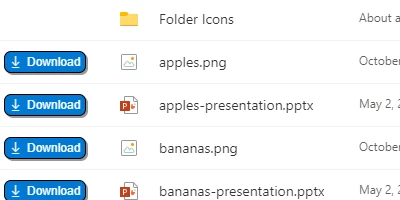
SharePoint is a versatile platform widely utilized by organizations to manage files and collaborative documents efficiently. One of its primary functions is to facilitate the sharing of files through a centralized library system. To further enhance usability, incorporating a download button next to each file within a SharePoint library can significantly streamline the process of file retrieval. This enhancement allows users to access the files they need with just a single click, fostering a more productive and efficient workflow.
Setting Up Your SharePoint Using Templates
Implementing download buttons in SharePoint libraries is a straightforward process, thanks to convenient templates available at
SharePointDashboards.com. By simply copying and pasting the designated template directly into your SharePoint list, you can effortlessly add download buttons with just a few steps. This not only enhances the functionality of your SharePoint libraries but also improves the overall user experience by making file access more intuitive and less time-consuming.
SharePointDashboards.com: A Hub of Templates
SharePointDashboards.com offers a wide array of templates tailored to meet diverse needs. New users can sign up to access 21 free templates, providing an opportunity to explore various functionalities and customize their SharePoint experience. With hundreds of templates to choose from, users can select and apply the ones that best align with their organizational requirements. Whether you need to automate processes, improve navigation, or integrate visual elements, SharePointDashboards.com has a template to suit your needs.
Charting and Visual Status Indicators
SharePoint templates can be instrumental in enhancing project management through charting and visual status indicators. By using these tools, teams can easily visualize project progress, deadlines, and outstanding tasks. This capability allows project managers to quickly identify bottlenecks or areas requiring immediate attention, thus improving decision-making and resource allocation.
- Charting: Incorporating charts into your SharePoint dashboard allows for a dynamic representation of data. By visualizing data across different dimensions, teams can gain insights into trends and patterns that may not be immediately apparent through tabular data alone.
- Visual Status Indicators: These indicators provide an at-a-glance understanding of project statuses. For example, color-coded flags or icons can signify which projects are on track, at risk, or overdue, enabling team members to prioritize tasks effectively.
Project Approvals and Employee Management
Integrating a template that facilitates project approvals in SharePoint can significantly streamline workflows. Automation of approval processes reduces the need for endless email chains or manual sign-offs, thus accelerating project timelines. Additionally, SharePoint can be employed for comprehensive employee management. Templates can help track employee performance, manage leave requests, and monitor task completion, all of which contribute to more effective HR management.
Status Tracking and Team Communication
Effective status tracking is a cornerstone of successful project management. By leveraging SharePoint templates for status tracking, teams can ensure that every member is informed about project updates in real time. This shared understanding minimizes the risk of miscommunication and enables seamless collaboration.
A shared dashboard enhances team communication by:
- Providing a unified platform where all team members can access essential project information.
- Facilitating transparent communication, thus aligning team efforts towards common objectives.
- Enabling real-time updates and notifications, keeping everyone in the loop regarding any changes or developments.
Use Case Scenarios for Enhanced SharePoint Libraries
The enhanced functionalities of SharePoint with integrated download buttons and dashboards can be applied in numerous scenarios. For instance:
Scenario 1: Marketing Campaign Management
A marketing team can use shared dashboards to keep track of campaign assets, deadlines, and milestones. Team members can easily download necessary files and monitor progress through visually represented data, ensuring successful campaign execution.
Scenario 2: Product Development Lifecycle
In product development, teams often need access to extensive documentation, design files, and client feedback. By integrating download buttons into a product library, developers can access files seamlessly, reducing potential delays and accelerating the development cycle.
Scenario 3: Financial Reporting
For finance departments, maintaining current and historical financial reports is crucial. With SharePoint, team members can download reports with ease and leverage dashboards to analyze financial data through charts and KPIs, driving more informed financial strategies.
Leveraging SharePoint JSON Formatting
To further customize your SharePoint experience, JSON formatting can be applied to a SharePoint list view by using a template. This approach allows users to manipulate the appearance of data within lists. By applying JSON templates, you can achieve a more visually appealing and structured representation of data, enhancing user engagement and comprehension.
In conclusion, the integration of templates and enhanced functionalities in SharePoint empowers organizations to streamline operations, improve workflow efficiency, and foster better communication among team members. By visiting
SharePointDashboards.com, users can explore and implement a multitude of templates designed to optimize their SharePoint experience, making it an indispensable tool in modern organizational management.