Introduction to Navigation in SharePoint
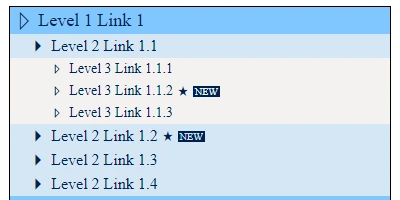
Building an efficient navigation system is a cornerstone of creating effective SharePoint sites, especially in scenarios where a vast array of information needs to be organized and accessed by users seamlessly. Among the various templates and tools available for enhancing SharePoint functionality, the Navigation Tree template available at
SharePointDashboards.com offers a robust solution for creating a comprehensive navigation hub. This template enables users to develop a navigation tree that spans up to three levels, making it easier to manage and display numerous links efficiently.
How Navigation Enhances SharePoint Functionality
Navigation in SharePoint isn't just about moving from one page to another; it's a method of creating a structured experience for users. An adept navigation system assists in charting project progress, indicating visual statuses, managing project approvals, overseeing employee tasks, and tracking overall status. By using a solution like the Navigation Tree template, organizations can present information hierarchically, which helps in breaking down complex information into digestible chunks, thereby facilitating better decision-making.
Benefits of a Shared Dashboard for Team Communication
Having a shared dashboard in SharePoint can significantly enhance team communication. With centralized access to key performance indicators, project updates, and critical data, teams can ensure that everyone is on the same page. This synchronization reduces the likelihood of miscommunication and errors, enabling teams to work more cohesively.
Some of the key benefits of shared dashboards include:
- Real-Time Updates: Team members can view the latest project updates and modifications instantly, minimizing lag time and enhancing collaboration.
- Improved Decision Making: Access to comprehensive data ensures that team members can make informed decisions rapidly.
- Operational Transparency: Team members gain insights into project statuses, individual performance metrics, and pending approvals, fostering a culture of transparency.
- Enhanced Productivity: By having readily available information, team members can focus on executing tasks instead of searching for data.
Setting Up a Navigation Tree via SharePointDashboards.com
The process of setting up a navigation tree using a template from SharePointDashboards.com is streamlined and user-friendly. Key steps include:
- Customize the styling for each level of the navigation tree to align with your organization's branding.
- Use the interface at SharePointDashboards.com to configure your desired settings.
- Copy and paste the generated template directly into your SharePoint list to deploy.
This setup is part of a broader suite of options available for free when you sign up, which includes an initial set of 21 templates.
Understanding SharePoint JSON Formatting
SharePoint JSON formatting is a technique used to customize the layout and presentation of SharePoint list views. By applying specific JSON formatting, list views can be transformed to enhance user experience and increase functionality. This is achievable by applying a pre-formatted template to your list view, which adjusts the visual styling and presentation of your data without altering the actual content. Using such templates allows you to present data in a more meaningful and visually appealing manner.
Use Case Scenarios
Consider the following use cases where a navigation tree and shared dashboard could be valuable:
- Project Management: In a large-scale project, different teams can use the navigation tree to access specific documents, timelines, and approval workflows, ensuring a comprehensive understanding of project phases and responsibilities.
- HR Onboarding: Human Resources departments can deploy a navigation tree to link new hires to necessary forms, policies, training materials, and contact information, streamlining the onboarding process.
- Client Communication: For client-centric operations, teams can create a navigation hub to track deliverables, set deadlines, and record communications, improving client relations and satisfaction.
Conclusion
Incorporating a navigation tree within your SharePoint environment serves as a strategic enhancement to improve accessibility, navigation, and team communication. The Navigation Tree template from SharePointDashboards.com offers an easy and customizable solution to create a sophisticated navigation structure. By utilizing shared dashboards, organizations can boost collaboration and foster an efficient working atmosphere, all while maintaining clear and effective communication channels. Setting up such navigation systems empowers teams to achieve their objectives more effectively, driving success across varied operational fronts.