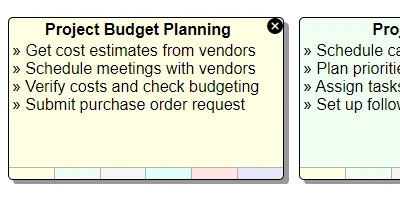
Introduction to Interactive Sticky Notes in SharePoint
In the dynamic world of project management and team collaboration, having a centralized place to track tasks and share updates is crucial. While many people rely on traditional sticky notes as a personal reminder system, digital transformation has led to the evolution of these into interactive board systems. Now, with the availability of the Sticky Notes template at
SharePoint Dashboards, you can easily convert your SharePoint list into a vibrant, interactive sticky notes board. This tool not only helps in task tracking but also enhances team communication and collaboration.
Enhancing Charting and Visual Status Indicators with Sticky Notes
The visual appeal of sticky notes is undeniable. By integrating sticky notes into SharePoint as part of a dashboard, teams can significantly boost the clarity and impact of their charts and status indicators. These notes can be color-coded to represent different project statuses, priorities, or departments. Such visual cues provide quick insights into the project's health, facilitate rapid decision-making, and ensure that stakeholders are always updated.
Streamlining Project Approvals
Project approvals often require quick exchanges of information and clarity about the status of tasks. An interactive sticky notes board provides a centralized view where decision-makers can easily see pending approvals, comments, and next steps. By using sticky notes, project managers can easily highlight overdue approvals or urgent tasks, ensuring nothing falls through the cracks and that projects progress smoothly.
Improving Employee Management and Status Tracking
For managers, keeping track of employee tasks and project statuses is crucial to ensure workload balance and effective resource utilization. The sticky notes board offers a clear view of each team member's responsibilities and progress. Managers can use the board to assign tasks, and employees can update the status of their assignments directly. This transparency fosters accountability and encourages proactive communication within the team.
Fostering Better Team Communication with a Shared Dashboard
One of the significant advantages of a shared interactive sticky notes dashboard is that it becomes a hub for team communication. Teams can collaborate more effectively, as everyone has access to the same up-to-date information, making collaborative planning and adjustments much easier. With real-time updates, team members remain informed about changes, new tasks, or comments, reducing the likelihood of misunderstandings and improving overall team cohesion.
Setting Up Your Sticky Notes Board with SharePointDashboards.com
The setup process for the sticky notes board on SharePoint is swift and user-friendly, thanks to the templates provided by
SharePoint Dashboards. Once registered, new users can access 21 free templates to get started. To establish your board, choose your desired look and feel options, then simply copy and paste the template into your SharePoint site. This intuitive setup ensures that even those with limited technical expertise can create an efficient and visually appealing task management system.
Utilizing SharePoint JSON Formatting for Customization
A key feature of setting up the sticky notes board is leveraging SharePoint's JSON formatting capabilities to customize list views. By applying the template to your SharePoint list view, you can redefine how data appears, ensuring it aligns with your team's unique needs and preferences. JSON formatting allows for customization of the field labels, conditional formatting, and more, providing an interactive and visually coherent system.
Use Case Scenarios for Sticky Notes in SharePoint
Interactive sticky notes in SharePoint can be utilized across various scenarios:
- Project Management: Track milestones, deadlines, and task dependencies, ensuring that all team members are aware of project progression.
- Marketing Campaigns: Visualize campaign phases, manage resources, and track KPIs to quickly adjust strategies as needed.
- IT Departments: Organize system upgrades, highlight technical issues, and update system status to ensure seamless operations.
- Human Resources: Schedule employee reviews, manage recruitment processes, and track onboarding activities.
Conclusion
In essence, the interactive sticky notes template transforms the way teams interact with information. By integrating this visual management tool within SharePoint, organizations can streamline communication, improve task management, and ensure transparency across departments. The combination of ease of use, customization through JSON formatting, and the collaborative power of a shared dashboard makes this tool indispensable in today's fast-paced work environments. Visit
SharePoint Dashboards to explore this and other valuable templates, and start transforming your team's communication and productivity today.