
Enhance Your SharePoint Lists with Easy Date Increment Features - June 13, 2025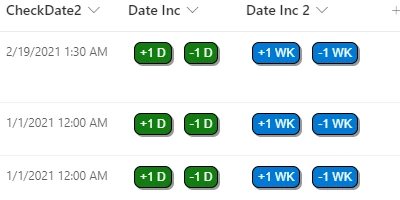
Introduction to SharePoint Date ManagementManaging dates efficiently is a fundamental necessity in any team-driven project environment. In SharePoint lists, dates play a crucial role in planning and tracking progress. Among these dates, due dates are especially critical as they help keep projects on track. With SharePoint's innate capabilities, users can enhance their productivity using the Date Increment buttons template available at SharePointDashboards.com. This functionality allows users to adjust dates within their SharePoint list view with a single click, enhancing both speed and efficiency without needing to open individual forms.How Date Management Fits into Charting and Visual Status IndicatorsEffective charting and the use of visual status indicators are crucial in project approvals and employee management. They provide a holistic view of a project's progress by visually summarizing data. In SharePoint, users can leverage date fields to influence these visual indicators. For example, overdue tasks can change color automatically, alerting project managers and team members to address pending items quickly. Utilizing the Date Increment buttons template expands this capability by allowing users to dynamically adjust date fields, thus ensuring charts and indicators are always up-to-date. This real-time updating fosters a proactive approach, eliminating the risk of project stagnation.Enhancing Communication with a Shared DashboardCommunication is vital in any collaborative endeavor. A shared dashboard acts as a central hub for information, enabling team members to access real-time updates. When date increments and other visual indicators are set up, teams can swiftly look at the dashboard for a snapshot of current statuses and priorities. This transparency reduces the need for constant check-ins or meetings, as everyone has access to the same information simultaneously. Efficient date management directly contributes to better communication by ensuring time-sensitive data is accurately reflected on the dashboard.Setting Up in SharePoint Using TemplatesImplementing these powerful tools can be surprisingly uncomplicated. SharePointDashboards.com offers a variety of templates for easy integration. By utilizing a simple copy-and-paste approach, even those new to SharePoint can enhance their lists with advanced features without a steep learning curve. After signing up, users gain access to 21 free templates, including the Date Increment buttons, streamlining the process of incorporating these functionalities into their SharePoint lists.Use Cases and ScenariosThere are numerous scenarios where the Date Increment buttons could be utilized to keep team members informed with critical information. Consider a project management team working under tight deadlines. With this template, they can quickly adjust due dates according to the project's dynamic needs, ensuring everyone is in alignment. Another example might be in human resources, where performance reviews or contract renewals require timely updates. This easy adjustment capability assures all stakeholders are aware and prepared for upcoming deadlines.Understanding SharePoint JSON FormattingOne of the keys to customizing SharePoint views is JSON formatting. JSON, or JavaScript Object Notation, is used to programmatically change how data is displayed in SharePoint list views. By applying a pre-defined template, such as those from SharePointDashboards.com, the JSON automatically formats the SharePoint list view to include features like Date Increment buttons. This allows users to enhance functionality without deep technical know-how, providing a user-friendly interface for complex operations.ConclusionIn today's fast-paced, project-driven environment, efficient date management is vital. By leveraging tools like the Date Increment buttons template from SharePointDashboards.com, teams can enhance their productivity, streamline communication, and maintain a real-time overview of their projects. With easy implementation and powerful functionality, these templates offer a practical solution for project managers and team leaders looking to optimize their SharePoint lists. Whether in project management, HR, or other fields, effective date management ensures your team stays on track, delivering success with every project milestone.Watch a video to learn more:
|
















