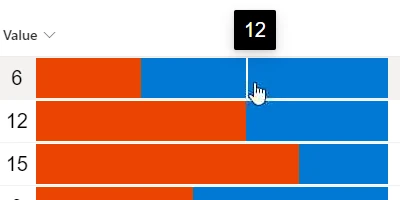
Introduction to Number Sliders in SharePoint Lists
Number fields are a staple in SharePoint lists, aiding in the organization and processing of quantitative data across various applications. Traditionally, number fields are static and require manual input, often limiting user interaction and experience. However, with the integration of a number slider control, users can enhance their input methods, enabling a more interactive and visually appealing interface. This feature is paramount in current digital environments, where dynamic interaction and ease of use are critical.
The number slider control in SharePoint is designed to allow users to adjust values incrementally within a predefined range. This interactive input method provides a visual indication of the value, akin to a bar chart, thus improving not only the functionality but also the aesthetic appeal of your SharePoint lists.
Enhancing User Experience with Visual Status Indicators
A number slider control transforms static number fields into dynamic tools that offer immediate visual feedback. This visual status indicator simplifies the user experience, making it more intuitive. By using a slider, users can interact with the list item directly, observing real-time adjustments to their inputs. This is especially beneficial for applications that require quick updates and precise input values.
Incorporating number sliders also fits seamlessly into various business applications, including:
- Charting: The visual aspect of a slider acts much like a bar chart, offering a graphical representation of data that can be crucial for decision-making processes.
- Project Approvals: Adjusting values quickly for project budgets or time allocations ensures agile responses to changing project demands.
- Employee Management: Tracking performance metrics or employee satisfaction scores becomes simpler and more interactive with a slider.
- Status Tracking: Immediate visual cues from sliders can help teams quickly grasp the status of ongoing tasks or projects.
Improving Team Communication with Shared Dashboards
One of the most compelling benefits of implementing a number slider control in SharePoint is the improvement in team communication. A shared dashboard, enriched with these dynamic elements, provides a common platform for team members to view and update critical information.
Here's how shared dashboards foster better communication:
- Centralized Information: Teams have real-time access to updated information, reducing the need for lengthy email chains and meetings.
- Transparent Updates: Any changes in list items are visible to all members, promoting transparency and ensuring everyone is on the same page.
- Efficient Decision-Making: With instant visual cues, teams can make informed decisions swiftly, enhancing productivity.
Setting Up a Dashboard with SharePointDashboards.com
Creating dynamic dashboards in SharePoint is simplified with templates from SharePointDashboards.com. By simply copying and pasting a template, users can instantly upgrade their static number fields to interactive number sliders. These templates, one of the hundreds available on the site, make it easier to rejuvenate your SharePoint environment without extensive coding knowledge.
SharePointDashboards.com offers a range of templates, with a starting package of 21 free templates, providing a valuable resource for any team looking to improve their SharePoint interface.
Use Case Scenarios for Critical Information Updates
The integration of number sliders in SharePoint lists is especially valuable in scenarios where timely updates are critical. Consider the following use cases:
- Sales Tracking: Sales teams can adjust sales targets or view real-time changes in their achievement metrics, promoting a competitive and motivated environment.
- Resource Allocation: Project managers can quickly update resources on a project, ensuring optimal allocation and use of assets.
- Budget Management: Financial teams can adjust budgets efficiently, responding swiftly to financial constraints or changes.
- Performance Metrics Tracking: HR departments can monitor and adjust employee performance metrics, aiding in performance reviews and development planning.
Understanding SharePoint JSON Formatting
SharePoint JSON formatting plays a crucial role in enhancing the aesthetics and functionality of list views. By applying a JSON template to a SharePoint list view, users can create a visually enhanced interface without delving into complex code structures. This JSON customization allows for:
- Customized Field Appearance: Users can alter the appearance of specific fields to improve clarity and comprehension.
- Conditional Formatting: Fields can be formatted based on set conditions, bringing attention to critical data points.
- Enhanced User Interaction: As with the number slider control, JSON formatting improves how users interact with the data, making it more engaging.
Incorporating these formatted templates enhances the overall functionality and user experience of SharePoint lists, turning static data points into interactive and visually appealing information hubs.
Conclusion
The introduction of a number slider control in SharePoint lists marks a significant upgrade in how data is managed and interacted with within your organization. From charting and project approvals to enhanced team communication and use case applications, the benefits are both widespread and impactful. Thanks to resources like SharePointDashboards.com and JSON formatting options, modernizing your SharePoint environment has never been more accessible. By embracing these tools, organizations can improve overall efficiency, communication, and decision-making processes, staying ahead in today's fast-paced business world.