
Enhance Your SharePoint List with Radio Button Options - June 27, 2025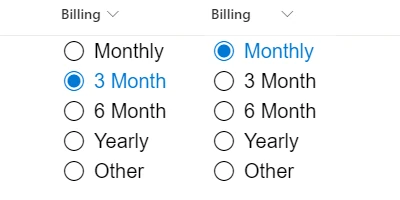
Introduction to SharePoint Dashboards and Radio ButtonsIn the modern business landscape, efficient project management and communication are pivotal to success. A well-structured dashboard can dramatically enhance team coordination, project tracking, and overall workflow efficiency. SharePoint, a versatile collaboration platform by Microsoft, offers a multitude of tools and templates to optimize these processes. One such tool that has become increasingly beneficial is the use of radio buttons for choice fields within SharePoint dashboards. This article delves into the intricacies of implementing radio buttons, their benefits in team environments, and how easy it is to set them up using a simple copy and paste template from SharePointDashboards.com.The Role of Radio Buttons in SharePoint DashboardsRadio buttons serve as a powerful input method for choice fields within SharePoint lists. They allow users to visualize all possible options at once, making decision-making faster and more intuitive. Implementing a column formatting template with radio buttons enables updates to be made directly from the SharePoint list view, bypassing the need to open forms for each change. This not only saves time but greatly increases the efficiency of list updates.Enhancing Charting and Visual Status IndicatorsWith their simplistic design and ease of use, radio buttons are perfect for applications involving charting and visual status indicators. For project managers, being able to clearly visualize option choices can streamline the analysis of team progress and project status. Radio buttons can be customized to match a project's color scheme, incorporate specific border styles, and vary in size, allowing for a seamless integration into any dashboard aesthetic.Streamlining Project Approvals with Choice FieldsIn scenarios where project approvals are necessary, radio buttons can be utilized to quickly select from pre-defined options such as "Approved", "Pending", or "Rejected". This eliminates the potential for errors that may occur with manual entry and provides a standardized approach to project status updates. Teams can maintain a clear and accurate record of project approvals, enhancing accountability and traceability.Improving Employee Management and Status TrackingEmployee management also greatly benefits from radio button choice fields in SharePoint. Tasks such as tracking attendance, performance, or project involvement can be simplified. For instance, managers can easily update and track an employee's availability for a task or project using radio buttons indicating "Available", "Busy", or "On Leave". This ensures transparent and effective employee management.Fostering Better Communication with Shared DashboardsDashboards in SharePoint not only centralize information but also facilitate better team communication. With shared dashboards, all team members have access to real-time updates, ensuring everyone is on the same page. This transparency reduces the risk of miscommunication and enhances collaborative efforts. When team members can see project status, deadlines, and responsibilities in one place, overall productivity is boosted.Setting Up Radio Buttons in SharePoint Using TemplatesThe process of setting up radio buttons in SharePoint is straightforward when using the templates available at SharePointDashboards.com. By simply adjusting the settings and copying the desired template into your SharePoint choice columns, you can have a fully functional dashboard in minutes. This method is accessible, requiring no advanced technical skills, making it ideal for teams of all sizes.Utilizing SharePoint JSON FormattingSharePoint JSON formatting allows for extensive customization of list views by applying templates. JSON (JavaScript Object Notation) is pivotal in transforming simple list views into visually appealing dashboards. Applying a JSON template to a SharePoint list view can be as simple as copying the provided template and pasting it into the format list view settings. This empowers users to create dynamic and engaging SharePoint lists effortlessly.Use Case ScenariosRadio buttons within SharePoint are versatile and can adapt to various operational needs. For example, in a sales team, radio buttons can be used to track the stage of a lead such as "Prospecting", "In Discussion", or "Closed". For a support team, they might track the status of a ticket as "Open", "In Progress", or "Resolved". These use cases illustrate the adaptability of SharePoint dashboards in delivering critical real-time information to team members.ConclusionIntegrating radio buttons into SharePoint dashboards is a game-changer for enhancing workflow efficiency and team communication. By providing a clear and straightforward way to track and update projects, SharePoint dashboards can transform how teams operate. Utilizing ready-made templates from SharePointDashboards.com simplifies the process, making it accessible to anyone looking to optimize their SharePoint experience. Explore the wealth of options available and take your SharePoint lists to the next level.Watch a video to learn more:
|
















