
Enhance Your SharePoint List with Multiline Text Input Fields - June 17, 2025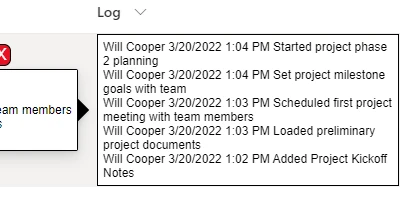
Introduction to Multiline Text Input Fields in SharePoint ListsIn the realm of digital office management, SharePoint stands out as a formidable tool for efficient project and employee management. Among its myriad of features, the multiline text input field in SharePoint lists is a crucial component that allows users to store extensive information such as notes, descriptions, and updates. These fields can accommodate a wealth of text, which makes them invaluable for documenting detailed information. This feature is even more powerful when enhanced by the Multiline Text Input template from SharePointDashboards.com, which provides advanced customization options for SharePoint lists.Advantages of Enhanced Multiline Text Input FieldsThe Multiline Text Input template revolutionizes the way SharePoint lists can be interacted with by letting users open and edit this field directly from the SharePoint list view. By employing this feature, users can enjoy a seamless editing experience and a highly customizable interface. You can choose your preferred font style, text size, text color, and background color, ensuring that your SharePoint lists are both functionally and aesthetically pleasing. For enhanced user experience, options such as a hover window effect and scrolling can be implemented, offering a more interactive and dynamic interface.How This Fits into Charting and Visual Status IndicatorsUsing multiline text input fields, SharePoint users can easily add detailed descriptions and notes that complement visual status indicators and charts, providing richer insights into projects or departmental goals. When these input fields are customized with templates, they contribute to a visually coherent and comprehensive dashboard that makes critical information even more accessible.Project Approvals and Status TrackingIn project management, having quick access to accurate and current information is crucial for decision-makers to facilitate swift project approvals. The multiline text input fields, enhanced by templates from SharePointDashboards, can be vital tools. They enable project managers to track and update statuses in real-time, assist in logging key project milestones, and record approvals right within the SharePoint environment.Improving Employee ManagementEmployee management becomes significantly streamlined with the use of enhanced multiline text input fields. Managers can maintain detailed records of employee performance, feedback, and other HR-related information directly within a SharePoint list. These fields turn into rich notes sections where supervisors can document performance reviews or set targets, all while keeping the data organized and visually consistent with the rest of the dashboard.Enhancing Team Communication with a Shared DashboardA shared dashboard created using SharePoint and the customizable templates from SharePointDashboards increases team communication efficiency by providing everyone access to the same up-to-date information. With consistently formatted text inputs, teams can effortlessly navigate to the information relevant to them. Real-time updates ensure that all team members are equipped with the latest insights, reducing misunderstandings and increasing teamwork effectiveness.Setting Up in SharePointDeploying these powerful enhancements using the templates from SharePointDashboards.com is straightforward. Users simply need to copy and paste the template into their SharePoint list settings. This easy implementation process liberates teams to focus more on leveraging the insights rather than bogged down in configuration.Use Case ScenariosConsider a scenario in which a marketing team is tracking the launch of a product campaign. The team can create a SharePoint list with multiline text input fields to store comprehensive notes about market research, campaign strategies, and performance analytics. These fields, enhanced with formatting and scrolling features, become invaluable as the team can quickly skim through varied content in a visually coherent format. Similarly, in a software development team, these enhanced fields can be used to track bug reports or feature requests. Developers can detail complex issues and solutions in a comprehensible manner, enabling seamless handovers and collaborative work.Leveraging SharePoint JSON FormattingSharePoint JSON formatting allows the application of intricately designed styles and behaviors to the list views. When using the templates from SharePointDashboards, this formatting is pre-set to deliver enhanced user interaction, which can be easily tailored to user specifications by adjusting the JSON. This feature empowers users to personalize their lists highly effectively, aligning perfectly with individual or organizational visual guidelines.ConclusionThe enriched functionality of multiline text input fields in SharePoint lists can significantly transform the daily operations of any organization. SharePoint Dashboards, with its plethora of templates, aids in ensuring these transformations are straightforward to implement and highly effective. By employing these customizable fields, teams can enhance communication, streamline management processes, and effectively update team members with critical information, all of which contribute to a more unified and efficient workflow. Explore the endless possibilities with your SharePoint lists by visiting SharePointDashboards.com.Watch a video to learn more:
|
















