The Importance of Enhancing SharePoint Interfaces with a Menu Button Template
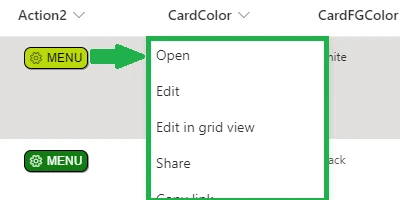
In corporate and collaborative environments, SharePoint has long been invaluable for managing documents, data, and team interactions. Yet, many users find certain functionalities are hidden behind less-obvious interface features. A prime example is the three-dot menu commonly found next to the Title field in SharePoint list records. For the uninformed, these dots hold a treasure trove of functionalities that often go unnoticed. Through the integration of a distinct menu button template from SharePointDashboards.com, users can significantly improve their SharePoint user experience.
Integrating Menu Buttons for Increased Accessibility
The integration of a menu button template into SharePoint list records aims to make additional actions more accessible. This enhancement addresses the primary pain point wherein users might overlook the default three-dot configuration. The importance of accessibility in a digital workspace cannot be understated. With a prominent menu button, users can quickly identify and implement key actions, thereby increasing workflow efficiency.
Such a button can be styled to align with your company's branding, ensuring a cohesive look and feel across the platform. This feature not only enhances usability but reinforces the organization's brand identity within its internal digital tools.
The Role in Charting and Visual Status Indicators
In project management and data analysis, visual status indicators like charts and graphs are vital in conveying information swiftly and succinctly. By implementing the menu button template in SharePoint, users can more easily access data entries and related functionalities to better support chart generation and visual data representation. Menu buttons may provide quick links to actions such as "Generate Chart" or "Update Status," thereby streamlining the data visualization process and facilitating more informed decision-making.
Project Approvals and Employee Management
Incorporating a menu button within a SharePoint list can simplify tasks related to project approvals and employee management. For instance, when an employee submits a project for review, the department head can quickly access approval or feedback actions through the enhanced menu, rather than sifting through various tabs or menus. This can expedite project timelines significantly, minimizing bureaucratic delays, and promoting proactive team management.
Effective Team Communication via Shared Dashboards
Communication is the backbone of any successful team. Shared dashboards facilitate a better understanding and distribution of key project details, timelines, and responsibilities. A well-constructed SharePoint dashboard equipped with a menu button allows teams to swiftly navigate through shared data, access necessary documentation, and update projects in real-time. This shared understanding ensures everyone is aligned with project goals and progress, reducing the chances of misunderstanding and miscommunication.
Setting Up with SharePointDashboards.com Templates
The ease of enhancing SharePoint with advanced functionalities through templates cannot be overstated. At
SharePointDashboards.com, users can access a library of button templates, including menu buttons, to augment their SharePoint lists. By simply copying and pasting the template code, users can instantly integrate this functionality into their existing SharePoint environment. The platform offers 21 free templates to get users started, encouraging businesses to explore modifications that can transform their daily operations.
Utilizing SharePoint JSON Formatting
An integral part of customizing SharePoint views is through JSON formatting. With JSON, users can precisely format the appearance of their SharePoint lists to create a more intuitive and visually appealing interface. By applying a JSON template to a SharePoint list view, users can define how each button and feature appears. This method provides a robust way of tailoring SharePoint to meet specific business needs without extensive programming knowledge, making it accessible to the wider organization.
Use Case Scenarios
Several scenarios illustrate the practical application of an enhanced SharePoint list interface with menu buttons:
- Project Updates: Team leads can quickly check project status, assign new tasks, or approve pending requests, all from the menu button.
- Resource Management: Managing resource allocation involves accessing various documents and logs. A menu button can streamline this by linking directly to the necessary resources.
- Sales Tracking: Sales teams can use menu buttons to update sales records, access customer databases, and generate performance reports instantaneously.
Conclusion
The journey to enhance SharePoint usability is not solely a technological upgrade but a strategic move to foster better team collaboration and efficiency. By introducing visible and user-friendly menu button templates, organizations can break down digital barriers that hinder productivity. With resources like SharePointDashboards.com, these enhancements are more accessible than ever, empowering every team to streamline operations through better interface design and more intuitive functionalities.