
Enhance Your SharePoint List with a Checklist Input Feature - June 28, 2025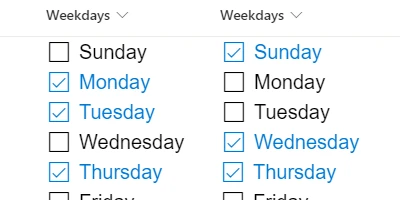
Streamlining Project Management with SharePoint ChecklistsIn the rapidly evolving landscape of digital project management, efficiency and clarity are crucial. One powerful tool that has gained considerable traction among businesses is the use of checklists within SharePoint. A particularly innovative advancement in this area is the Checklist Template available at SharePointDashboards.com. With this tool, users can convert multiselect choice fields into interactive checklists, revolutionizing task management and team communication on SharePoint.Interactive Checklists: Enhancing Task ManagementChecklists are a staple in task management, serving as a simple yet effective way to track progress and manage tasks. Traditionally, users have had to navigate through complex forms to update these lists. However, the Checklist Template enables direct updates from the SharePoint list view, simplifying this process. By converting choice fields into interactive checklists, team members can mark items as complete, prioritize tasks, and ensure nothing falls through the cracks. This feature makes task management more intuitive and less time-consuming, thus enhancing productivity.Aligning Checklists with Charting and Visual Status IndicatorsIncorporating interactive checklists into SharePoint not only streamlines task management but also enhances charting and visual status indicators. These tools are essential for project approvals, employee management, and status tracking. By providing a clear, visual representation of task completion, teams can quickly assess project status and make informed decisions. Additionally, visual indicators allow managers to identify bottlenecks and address them proactively.Enhancing Communication with Shared DashboardsA shared dashboard can significantly improve communication among team members. It serves as a centralized hub where all relevant information is accessible to everyone involved. With a shared dashboard, updates become instantaneous, reducing the need for constant back-and-forth communications. Team members can log in, view real-time updates, and adjust their tasks accordingly. This fosters a robust team culture built on transparency and shared goals, ultimately driving team performance and project success.Setting Up SharePoint Checklists: Easy as Copy and PasteOne of the most significant advantages of the Checklist Template from SharePoint Dashboards is its ease of setup. Users can configure the look and feel of the input fields to match their specific needs directly from the SharePoint Dashboards website. Once configured, it's simply a matter of copying and pasting the template into the SharePoint choice field. This user-friendly setup requires no installation on the SharePoint site, eliminating potential technical barriers and allowing businesses to focus on what truly matters: managing their projects efficiently.Real-World Use CasesThe versatility of the Checklist Template is reflected in its wide range of use cases. Consider a software development team working on a new application. By employing interactive checklists, they can track feature completions, bug fixes, and testing phases. Another example is a marketing team managing a product launch. They can use shareable dashboards to organize promotional activities, monitor timelines, and ensure synchronized efforts across departments. These scenarios highlight how the Checklist Template can keep team members informed, ensure tasks are completed on schedule, and maintain alignment towards shared objectives.Unlocking Potential with SharePoint JSON FormattingA crucial aspect of customizing SharePoint lists is utilizing JSON formatting. JSON (JavaScript Object Notation) allows users to apply specific formatting rules to SharePoint list views to enhance their functionality and appearance. By applying a template to a SharePoint list view, users can leverage JSON formatting to create more engaging and interactive list presentations. This empowers businesses to tailor their SharePoint experience to better fit their operational needs, thus driving more efficient project management.Conclusion: Embracing Efficiency with SharePoint DashboardsIn conclusion, the use of interactive checklists in SharePoint represents a significant step forward in project management. By leveraging the Checklist Template from SharePoint Dashboards, teams can enhance task management, improve communication, and drive project success with minimal effort. With easy setup and versatile use cases, businesses can fully capitalize on the potential of SharePoint to streamline their workflows. Whether it's software development or marketing campaigns, the ability to keep teams informed with critical information is invaluable. As organizations continue to embrace digital transformation, tools like these will be essential for sustaining competitive advantage and achieving project objectives.Watch a video to learn more:
|
















