
Enhance Your SharePoint Date Field with the Date Input Template - June 15, 2025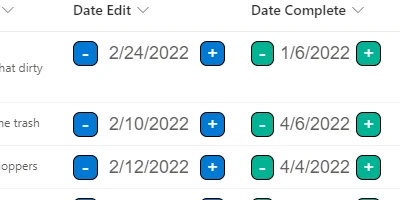
The Power of SharePoint: Enhancing Date Field FunctionalityThe dynamic world of project management and team collaboration demands tools that enhance efficiency and streamline processes. As organizations strive for smooth workflows and seamless communication, having the right technology becomes imperative. A powerful tool in this regard is the Date Input template available at SharePointDashboards.com. This innovative template allows users to improve the functionality of the SharePoint date field by enabling direct editing in the list view and featuring increment buttons for easy date adjustments. The ease of use, coupled with the ability to customize the appearance of dates, significantly boosts team productivity and collaboration.Charting Beginnings: A Step Forward in Date ManagementCharting, visual status indicators, project approvals, and employee management all have a core need for effective time management and status tracking. SharePoint offers a robust platform for integrating these functionalities, and the Date Input template enhances this capability. By allowing dates to be edited directly in the SharePoint list view, teams can update schedules and timelines without navigating away from the main interface. This direct interaction with data reduces time spent on administrative tasks, allowing team members to focus on core responsibilities. The capacity to adjust dates using increment buttons further simplifies task management. This feature proves invaluable in project approvals where deadline adjustments are frequent. Project managers can make real-time updates without hassling through complex form entries, thereby maintaining up-to-date status indicators for stakeholders.Improving Team Communication with Shared DashboardsA shared dashboard is more than just a collection of data; it is a hub for team communication and collaboration. Implementing such a dashboard in SharePoint enables teams to have a comprehensive view of project statuses, upcoming deadlines, and employee progress at a glance. The Date Input template enhances this by ensuring that date-related information is always current and accurate. With a shared dashboard, visibility into project progress is heightened, reducing the chances of miscommunication and ensuring that everyone is on the same page. Team members can gauge their tasks against the overall project timeline, allowing for better planning and prioritization.Setting Up with SharePointDashboards.comSharePointDashboards.com offers a straightforward approach to setting up these powerful tools using simple copy-and-paste templates. Users can easily integrate the Date Input template into their SharePoint lists, transforming how dates are managed and displayed. This ease of setup means that even those with limited technical expertise can enhance their SharePoint experience, reducing the dependency on IT departments and allowing for more agile management practices. The website provides access to not just the Date Input template but a suite of 21 free templates designed to enhance SharePoint functionality. For subscribers, hundreds of additional formatting templates are available, each crafted to improve the visual and user-friendly nature of SharePoint sites.Use Case ScenariosThe applicability of this template is broad, touching various aspects of business operations. Consider a project management team that needs to keep track of multiple milestones across different projects. The Date Input template allows them to manage deadlines efficiently without losing sight of the bigger picture. In another scenario, a human resources team tracking employee onboarding can utilize this tool to ensure timely completion of orientation tasks. The ability to adjust start or completion dates swiftly ensures that the onboarding process proceeds smoothly. In summary, any team that deals with time-sensitive information can benefit from this setup, leveraging the direct date editing and updating functionalities to stay informed and responsive.Understanding SharePoint JSON FormattingA key component of customizing SharePoint lists is JSON (JavaScript Object Notation) formatting. This powerful feature allows users to transform list views by applying custom styles and formats. By using a template from SharePointDashboards.com, users can quickly apply JSON formatting to their date fields, enhancing how the information is displayed. The process is simple: copy the template code and paste it into the SharePoint list view formatting settings. This operation can be completed in minutes, offering a quick way to tailor list views to meet organizational needs without the necessity for complex programming knowledge.Embracing Efficiency with SharePointThe integration of the Date Input template into your SharePoint arsenal paves the way for a more streamlined, efficient work environment. By reducing the friction associated with date management, teams can focus on what truly matters – achieving project goals and fostering effective communication. In conclusion, the Date Input template from SharePointDashboards.com revolutionizes how teams interact with time-related data within SharePoint. Through its user-friendly interface and easy integration process, it enhances productivity, ensuring that timelines are met and communications are clear. As organizations continue to seek effective solutions for project and employee management, the adoption of such tools stands as a testament to the commitment to excellence and innovation.Watch a video to learn more:
|
















