Unlocking Efficiency: The Power of Inline Edit Templates in SharePoint Dashboards
In the dynamic world of project management and team coordination, efficiency and accuracy are paramount. One tool that has revolutionized how teams manage their data is the SharePoint Inline Edit Template. This feature allows users to make fast updates directly from their SharePoint list view, mirroring the ease of updating an Excel workbook. This innovative solution eliminates the complexity and risks associated with the traditional grid edit mode and paves the way for improved data handling and team communication.
Streamlining Tasks with SharePoint Dashboards
Utilizing a shared dashboard significantly boosts team productivity. Dashboards serve as a centralized hub where all relevant information is accessible at a glance. Teams can chart progress, indicate task status, and track approvals efficiently. A well-organized dashboard ensures project managers and teams can make informed decisions promptly, facilitating a seamless workflow.
For team communication, a shared dashboard simplifies how information is disseminated and received. When all team members have access to the same data, it reduces misunderstandings and ensures everyone is on the same page. This level of transparency is crucial for maintaining momentum and ensuring all stakeholders are aligned with project goals.
Setting Up Dashboards with SharePoint Templates
Creating an effective dashboard is straightforward with SharePoint and the templates available at
SharePointDashboards.com. These templates allow for the easy configuration of dashboards, where users can simply copy and paste the template, allowing immediate functionality enhancements. By applying these templates, teams can tailor their dashboards to track specific project metrics, manage employee tasks, and document project approvals seamlessly.
Use Case Scenarios for SharePoint Dashboards
The application of SharePoint Dashboards with Inline Edit Templates spans multiple scenarios:
- Project Status Updates: Teams can update project statuses in real-time, ensuring all members have current information at their fingertips.
- Employee Task Management: Managers can assign and update task statuses, which helps in efficiently tracking employee performance and workload.
- Meeting Preparations: Dashboard data can be crucial for preparing for meetings, providing all necessary metrics and information needed for effective discussions.
- Budget Tracking: Financial teams can maintain budgetary updates, linking expenditure to specific projects and milestones.
These scenarios showcase how effective a responsive SharePoint Dashboard can be in communicating critical information across various team functions.
Enhancing SharePoint Lists with JSON Formatting
SharePoint JSON formatting is a powerful tool that drastically enhances the appearance and usability of lists. By applying a JSON template to a SharePoint list view, users can customize list fields to display information more effectively. This formatting allows users to highlight key data points with colors or icons, providing a visual status indicator that enhances data comprehension and speeds up decision-making processes.
Templates from SharePointDashboards.com leverage JSON formatting to create interactive and visually appealing dashboards. Users can apply these templates to transform list data into dynamic business intelligence tools, driving efficiency and accuracy in data handling.
The Ease of Inline Edit Templates
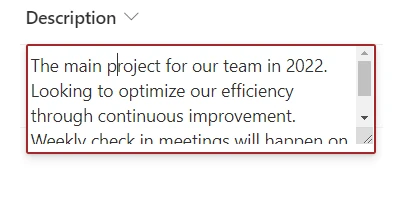
Inline Edit Templates are designed for simplicity and utility. These templates change a field to allow updates directly within the SharePoint list view. Users can quickly alter data without entering the grid edit mode, minimizing the risk of unintended batch updates. This precise control over data integrity is critical, especially in environments where sensitive information and large datasets are managed regularly.
To use these templates, users simply need to sign up for free at
SharePointDashboards.com, copy the desired template, and paste it into their SharePoint field. This ease of use means that even teams with minimal technical expertise can efficiently implement advanced data handling features.
Conclusion: A New Era of Data Management
In conclusion, Inline Edit Templates and SharePoint Dashboards represent a new era of data management and team collaboration. By enabling fast updates and fostering improved communication, these tools help organizations maintain agility and precision. Furthermore, the convenience of setting up such dashboards using templates from
SharePointDashboards.com makes it accessible for all team sizes and project types.
Embracing these tools ensures that teams not only meet their current goals but are also well-equipped to handle future challenges in a dynamic work environment. Through advanced dashboard solutions, businesses can streamline their operations and achieve higher levels of productivity and success.