
Effortlessly Organize Tasks with SharePoint List Boards - June 24, 2025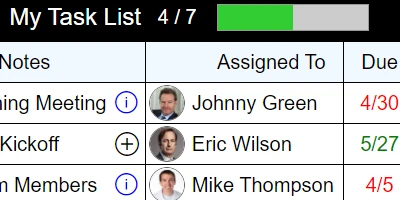
Setting Up an Easy-to-Use Custom Task List in SharePointThe dynamic nature of modern work environments necessitates tools that simplify task management and enhance team communication. Among the myriad options available, setting up a custom task list in SharePoint using a template from SharePointDashboards.com stands out as an efficient and straightforward solution. This template offers a fluid and responsive grid view, making task allocation and status tracking seamless and intuitive. Here, we delve into how this setup significantly fits into charting, visual status indicators, project approvals, employee management, and status tracking, ultimately facilitating improved team communication.The Role of Task Lists in TeamsEffectively managing tasks is crucial to any team's success. By employing a structured task list, teams can ensure that every member is aware of their responsibilities and the project's overall timeline. SharePoint task lists allow users to effortlessly prioritize tasks, assign them to relevant team members, and track their status in real time. With just a few clicks, managers can make necessary adjustments, ensuring that tasks are completed efficiently and deadlines are met.Visualizing Status with Color-Coded IndicatorsA unique feature of the SharePoint task list template from SharePointDashboards.com is its color-coded status tracking. This intuitive feature allows team members to quickly assess the status of various tasks at a glance. By using different colors to denote task statuses such as "Not Started," "In Progress," "Completed," or "On Hold," teams can easily monitor their progress. This visual aid is especially beneficial during meetings or status updates, providing a simple overview of the project's health without needing to delve into detailed reports.Communication and Dashboard SharingTeams communicate more effectively when they have access to a shared dashboard that provides real-time updates and insights into ongoing projects. By centralizing task information, SharePoint dashboards ensure that all team members are aligned and informed. With a shared dashboard, discussions during team meetings become more focused and productive, as everyone has access to the same set of data.Easy Setup with SharePointDashboards.comWhat makes this task list template particularly appealing is its ease of setup. After a few basic settings adjustments in SharePoint, users can copy and paste the template directly into their SharePoint list. This task list is just one of several templates available at SharePointDashboards.com, where users can find an array of visual indicator templates tailored to their needs. For organizations interested in exploring the benefits of these tools, signing up to download 21 free templates using just your name and email is a no-brainer.Scenarios for Use and Critical UpdatesConsider a scenario where a software development team is working on a tight delivery schedule for a new product release. By utilizing a SharePoint task list, the team can assign tasks efficiently, set priorities, and provide regular updates on each task's status without overwhelming team members with excessive communication. Another scenario could involve a marketing team coordinating an upcoming campaign launch. Here, the task list can help manage the wide variety of tasks involved-from content creation to promotional activities-ensuring that deadlines are met, and that everyone is on the same page.SharePoint JSON FormattingAn essential aspect of enhancing SharePoint lists is SharePoint JSON formatting. This feature allows users to create customized visual displays of their task lists. By applying a template to a SharePoint list view, users can manipulate how data is presented, adding even more flexibility and visual appeal to their dashboards. JSON formatting is a powerful tool that can turn a standard list into an interactive, user-friendly interface that meets specific organizational needs. In conclusion, the custom task list template from SharePointDashboards.com presents an efficient, user-friendly solution for managing tasks, tracking status, and enhancing team communication. Its intuitive design and ease of implementation make it an excellent choice for any organization looking to streamline project management processes. Whether managing a small team or overseeing a large project, this tool equips teams with the resources necessary to stay organized, informed, and on track.Watch a video to learn more:
|
















