The Ultimate SharePoint Calendar: Introducing the "Calendar Plus" Template
For organizations that rely on SharePoint for managing projects, coordinating events, and tracking timelines, the out-of-the-box calendar can often feel lacking. Many users find it missing the intuitive features they require in a custom calendar solution. Enter the "Calendar Plus" template from SharePointDashboards.com, designed to transform the basic SharePoint calendar into an all-encompassing planning tool with robust features.
Enhanced Features for Event Management
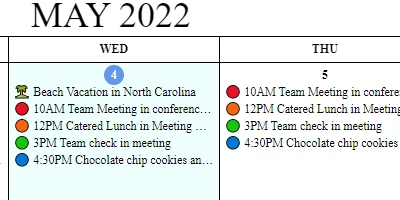
The "Calendar Plus" template is engineered to surpass the capabilities of the default SharePoint calendar. Users can add up to 8 custom events per day, each distinguished by unique icons and color schemes. This level of customization is particularly beneficial for organizations that need to categorize different types of events and meetings at a glance.
Hover information boxes further enrich the user experience by providing an instant overview of event details. A simple hover action reveals event information such as location, links, meeting details, and more, without cluttering the main calendar view. These features together offer a seamless and informative interface far more advanced than the basic SharePoint offering.
Integration with SharePoint for Improved Team Communication
In today's fast-paced work environments, clear communication is key. The "Calendar Plus" template facilitates improved communication within teams by offering shared visibility on schedules and project timelines. When everyone has access to the same dashboard, misunderstandings are minimized, and collaboration is enhanced. Team members can effectively plan around each other's schedules and attend necessary events and meetings.
One of the standout features is the ability to set up this enhanced calendar using a simple copy-and-paste template available at SharePointDashboards.com. This convenience allows organizations to rapidly improve their SharePoint environment with minimal setup time, thereby maximizing efficiency and productivity.
SharePoint JSON Formatting for Customized Views
The implementation of JSON formatting in SharePoint provides a method to create visually appealing and functional list views. By applying the "Calendar Plus" template, organizations can leverage JSON formatting to alter the aesthetics and functionality of their calendar view, making it more engaging and easier to navigate. This allows for a data-driven visual approach that enhances user interaction and makes information more digestible.
Use Case Scenarios
The "Calendar Plus" template can serve various use cases, making it an invaluable tool across different sectors:
- Project Management: Keep track of project milestones, deadlines, and meetings all in one centralized location, ensuring that all team members are on the same page.
- Event Coordination: Organize and manage corporate events, training sessions, and client meetings efficiently with custom event icons and colors for quick identification.
- Resource Scheduling: Coordinate shared resources such as conference rooms and equipment, avoiding double bookings and last-minute conflicts.
- Employee Management: Use the calendar to track employee vacations, remote workdays, and shift schedules, ensuring that workflows remain uninterrupted.
Streamlining Charting and Visual Status Indicators
A significant use of the enhanced calendar involves integrating visual status indicators and charts to provide a snapshot view of project health. Team leads and project managers can use these visual tools to quickly assess timeline bottlenecks, resource allocation, and other critical elements, allowing for timely interventions and decision-making.
Facilitating Project Approvals and Status Tracking
The "Calendar Plus" template is also an excellent platform for tracking project approvals and status updates. Integrating with other SharePoint features, teams can establish workflows that automatically update calendar entries based on approval stages, providing real-time visibility into project progress.
Conclusion
For organizations looking to maximize the value derived from SharePoint, the "Calendar Plus" template presents an invaluable upgrade. With its advanced features, ease of setup, and ability to foster better communication and coordination, it stands out as the ultimate calendar solution. By visiting
SharePointDashboards.com, organizations can download the template, implement it into their SharePoint environment, and watch optimal collaboration unfold across their teams.