Introduction to SharePoint Approval Processes
Effective project management and team collaboration often hinge on clarity and communication. Within the ecosystem of SharePoint, approvals play a critical role in facilitating these aspects. Approvals ensure that project components move through necessary checks and balances before reaching completion. To streamline this process, the Approval Summary template at
SharePointDashboards.com offers a simple and effective solution.
Enhancing Your SharePoint Approval Process
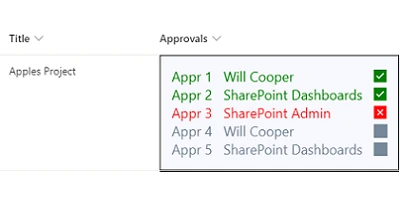
In SharePoint environments, an organized approval process is vital for maintaining workflow efficiency. The Approval Summary template is designed to simplify this aspect by showcasing a list of approvers for a record and indicating the approval status for each one. This template can accommodate up to ten approvers, providing a clear visual summary of the approval status. The ease of use and straightforward nature of this template make it an invaluable tool in any SharePoint workflow.
Implementation of the Approval Summary Template
The simplicity of deploying the Approval Summary template cannot be overstated. Once the template settings are configured, users can simply copy and paste it into their SharePoint list column. This quick implementation process allows teams to immediately enhance their approval processes without extensive technical know-how. Utilizing this template in conjunction with the Approval Button template, also available at SharePointDashboards.com, further streamlines team management within SharePoint.
The Role of Dashboards in Enhanced Team Communication
Having a shared Dashboard fosters better communication and planning among team members. Teams can visualize their current project status, approval statuses, and team objectives, all in one place. This shared view helps create a cohesive understanding of project timelines and responsibilities, reducing miscommunication and increasing overall team efficiency.
Dashboard Use Cases
Dashboards can be employed in various scenarios to provide critical information updates to team members, such as:
- Project Tracking: Use a dashboard to give a real-time overview of project statuses, critical paths, and outstanding tasks.
- Status Indicators: These provide visual cues that can quickly convey the health of a project or task.
- Employee Management: Dashboards enable managers to track employee performance and workloads, fostering better resource allocation.
Setting Up in SharePoint Using Templates
SharePoint users can leverage
SharePointDashboards.com templates to easily create dashboards. These templates are essential for any team looking to optimize their workflow on SharePoint. A major advantage is the ability to quickly enhance functionalities through simple copy-paste templates, bypassing the need for extensive coding or custom development.
SharePoint JSON Formatting for Enhanced Customization
SharePoint JSON formatting allows users to apply highly customized views to their SharePoint lists. By using a template to apply JSON formatting to a SharePoint list view, users can create visually appealing, easy-to-read dashboards that communicate necessary information efficiently. This customization can align SharePoint to better fit organizational needs, enhancing user interaction, and visibility of critical data.
Conclusion
Incorporating the Approval Summary template from
SharePointDashboards.com into your SharePoint environment can significantly enhance approval processes, streamline project management, and improve team communication. With the added benefit of JSON formatting, teams are empowered to customize their dashboards to better serve organizational needs, ultimately driving productivity and success. Whether through enhanced approval processes or comprehensive dashboards, these tools position teams for effective communication and strategic project execution.